A Pomodoro App With a Virtual Pet That Actually Wants You to Finish the Interval
The Pomodoro Technique is simple on paper: work for a fixed interval, take a short break, repeat. The hard part was never understanding the method, it's sticking to it once the novelty of a kitchen timer wears off. Nurrow keeps the same interval structure that's made Pomodoro popular for decades, but attaches a reason to care about each interval landing cleanly: finish a work block and you've got a shot at an egg that hatches into a pet living on your home screen.
The Interval Structure, Not Reinvented, Just Rewarded
Nurrow doesn't change what a Pomodoro interval is. Work for a set block of time, then break for a shorter block, then repeat. What changes is what happens when a work interval ends. Instead of a beep and a blank feeling, you get a chance at an egg drop. That single design choice is the whole thesis of the app: the timer mechanic works the same as it always did, the payoff structure is what's different.
You can read more about the technique itself, its history, and why 25 minutes became the default unit of focused work, on our full Pomodoro Technique guide. This page is about how Nurrow's timer specifically works.
Five Timer Presets, One Consistent Reward Rule
Nurrow ships with five built-in interval presets, so you're not locked into the classic 25/5 split if it doesn't fit your work:
- Pomodoro (25/5): the standard split, good for tasks with a clear next step.
- Quick (15/3): for warming up or clearing small tasks between bigger commitments.
- Duo (50/10): doubled intervals for work that needs more runway before you hit flow.
- Desktime (52/17): based on productivity research pointing to a longer break ratio.
- Ultradian (90/20): matched to the ultradian rhythm cycle, for deep, single-task work.
There's also a custom mode if none of the presets fit: work intervals from 1 to 180 minutes and breaks from 1 to 60 minutes, set however you like. Whichever preset you choose, the underlying rule is the same: the work interval is what earns you an egg chance. The break is recovery time, not scored time.
How a Finished Work Interval Turns Into an Egg
Every completed work interval rolls a chance at an egg drop, and that chance scales with the length of the interval you just finished. A 15-minute Quick interval sits around a 20% chance. The classic 25-minute Pomodoro interval is close to 50%. Step up to a 50-minute Duo interval and you're near 80%, a 52-minute Desktime interval close to 85%, and a full 90-minute Ultradian interval guarantees an egg every time. Custom intervals fall somewhere along that same curve based on their length.
The mechanic only cares about the work portion of the cycle. A skipped or shortened break doesn't cost you anything, and it doesn't earn you anything either, it just moves you to the next work interval faster. What does matter is finishing the interval you started. Close the app or end early and that interval's egg chance is gone, which is a quieter kind of accountability than a plain kitchen timer ever gave you.
Why a Pet Changes Whether You Actually Finish the Cycle
A kitchen timer, or the timer app already built into your phone, tracks the same 25/5 split just fine. What it doesn't do is give you a reason to protect the interval once you're fifteen minutes in and your attention starts to drift. A checkmark on a to-do list is a fine record of what happened, but it's not much of a pull in the moment. An egg that might be sitting in your inventory when the timer ends is a different kind of incentive: it's uncertain, it's visible, and it's tied directly to the thing you're supposed to be doing right now, which is finishing this interval.
That's the behavioral bet behind pairing a Pomodoro timer with a pet: variable rewards keep attention on the interval boundary in a way a plain countdown doesn't. You can read more about the pet side of things, hatching, rarities, and collection, on the main Nurrow homepage, but the mechanic that makes it work is the timer itself: no completed interval, no egg chance.
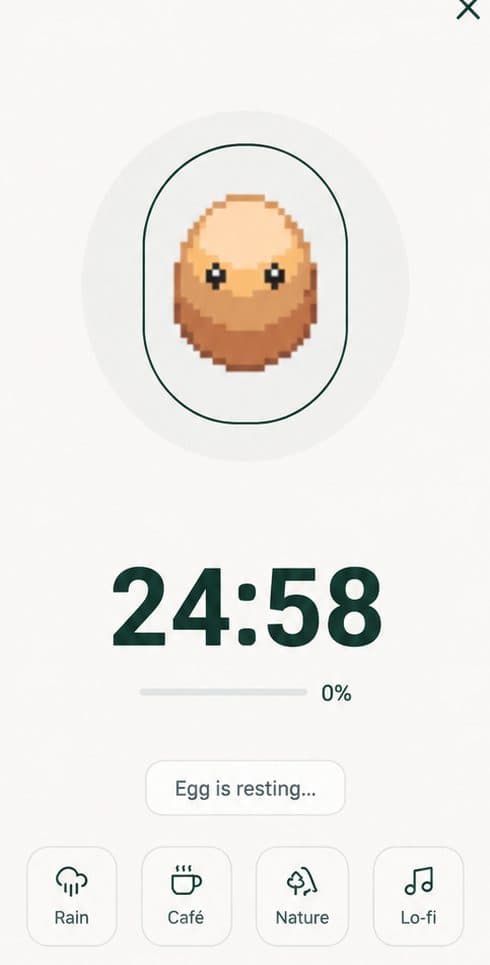
Walking Through One Full 25/5 Cycle
Here's what a single Pomodoro cycle looks like end to end, using the default 25-minute work and 5-minute break split:
- Start the session. You pick the Pomodoro preset (or leave it as your default), optionally turn on website blocking, and hit start. The 25-minute countdown begins and your pet settles in next to the timer.
- Work interval runs. The countdown ticks down in the foreground. If you enabled blocking, distracting sites are off limits until the interval ends. Your pet stays visible but idle, it's waiting on you, not doing anything itself yet.
- Interval completes. At zero, Nurrow marks the work interval as finished and rolls the egg drop chance for a 25-minute session, roughly a coin flip. If it hits, an egg appears in your inventory.
- Break starts. The 5-minute break begins automatically. Blocking lifts, so you can check your phone or step away without needing to end the session. Your pet's screen presence turns more active during this stretch.
- Break ends, cycle repeats. Nurrow prompts you to start another work interval. You can go straight into another 25/5 cycle, switch presets, or stop there, either way the egg you earned (if you earned one) is already banked.
Nothing about that flow is more complicated than a standard Pomodoro app. The difference is entirely in step three: finishing the interval means something concrete happened, not just a timer resetting to zero.
Why This Matters More Than It Sounds
Pomodoro's biggest failure mode isn't misunderstanding the technique, it's abandoning it after a few days because there's nothing pulling you back to the timer once the initial novelty fades. Tying interval completion to an egg chance gives the technique a reason to stay boring in the good way: predictable enough to build a habit around, with just enough uncertainty on the reward side to keep each finished interval feeling like it counted for something.
Nurrow is free to start, with no account required to begin. A premium subscription is optional and unlocks extras like faster hatching and exclusive pets, but the Pomodoro timer and egg drop mechanic work the same either way.
Keep Exploring
Frequently Asked Questions
Can I change the 25/5 interval lengths?
Yes. Alongside the classic 25/5 Pomodoro preset, Nurrow ships with four other presets (50/10, 52/17, 90/20, and a quick 15/3 mode), plus a fully custom mode where you set your own work length from 1 to 180 minutes and break length from 1 to 60 minutes. Switch presets any time from the timer screen.
What actually happens during the break?
The work timer stops counting toward your egg drop chance, your pet relaxes on screen, and any site blocking you turned on for the work interval lifts so you can check messages or stretch your eyes. When the break ends, Nurrow prompts you to start the next work interval.
Do I lose my egg if I skip or shorten a break?
No. The egg drop is decided when you complete a work interval, not the break that follows it. Skipping a break doesn't cost you a reward, but it also doesn't earn you one, the egg chance is tied purely to finishing the work portion of the cycle.
Does a longer Pomodoro interval actually get me more?
Yes. Egg drop probability scales with work interval length: a 15-minute Quick session sits around a 20% chance, the classic 25-minute Pomodoro is closer to 50%, and a 90-minute Ultradian session guarantees an egg. Longer, uninterrupted intervals pay off more often.
What if I close the app mid-interval?
Closing out or ending early cancels that interval's egg chance. The session has to run to completion for the work interval to count, which is part of why the reward loop encourages you to actually finish the 25 minutes instead of wandering off at minute 18.
Ready to Start Focusing?
Nurrow is free to start, with no account required to begin. Download it today and put your next focus session to work.