The Best ADHD Apps for Adults (and Where a Focus Timer Fits In)
By Aaron Wakely, Nurrow founder · July 19, 2026
Most "best ADHD apps" lists lump every productivity app into one pile, as if a daily planner, a coaching program, and a focus timer all solve the same problem. They don't. This roundup covers three apps genuinely built around ADHD-specific needs (planning a day visually, learning coping strategies, and holding a routine together step by step), what each one is actually good at, and where its limits are. Then it places Nurrow honestly in that lineup: not as a universal ADHD toolkit, but as the pick for one specific piece, actually staying inside a focus session once you've started it.
Tiimo: A Visual Daily Planner Built for Neurodivergent Users
Tiimo lays your day out as a color-coded, icon-tagged timeline instead of a plain list, which makes it easier to see at a glance what's happening and when. Its AI feature can take a messy, brain-dumped task list and turn it into a realistic scheduled plan with time estimates for each step, which is genuinely useful if breaking work into steps and guessing how long things take is where you get stuck. It also includes a countdown/focus timer, home-screen widgets, reusable routines, and sync across iPhone, iPad, Apple Watch, Android, and the web. It won iPhone App of the Year at the 2025 App Store Awards, which reflects how polished the planning experience is. What it's not built for: once you're actually mid-task and need to block distracting websites or stay accountable for a single deep-work block, Tiimo's built-in timer is a lighter feature bolted onto a much bigger planning app, not its main focus.
Inflow: CBT-Based ADHD Management With Real Coaching
Inflow is built around cognitive behavioral therapy (CBT) principles, delivered through bite-sized educational modules and interactive exercises covering things like rejection sensitivity, time blindness, and organization. On paid plans, which start around $47.99 a month or $199.99 a year, it also offers real human coaching and community co-working focus rooms, plus an AI companion feature. That combination (structured education, actual coaches, and community) is a meaningful step up from a self-guided app if you want a program rather than a tool. The honest caveat: it's a paid, structured commitment, not a quick free download you open for five minutes between tasks. If you just need help starting the next task, Inflow's coaching model is more program than most people need for that alone.
Routinery: Step-by-Step Routine Builder
Routinery is about routines specifically: you build a routine as an ordered list of steps, each with its own time allocation, and the app walks you through it with a countdown timer, voice or text-to-speech alerts, and a visual progress bar so you always know what's next. It layers habit tracking with completion analytics and a reward badge system on top, which helps routines stick over weeks rather than days. It was named Best ADHD App by Forbes Health in 2025 and voted App of the Day by the Apple App Store in 2026. Where it doesn't fit: it's built for repeatable sequences (a morning routine, a wind-down routine, a cleaning routine), not for open-ended focus sessions where you're just trying to sit with one task until a timer runs out. If what you need is a single uninterrupted work block instead of a multi-step sequence, Routinery isn't really solving that problem.
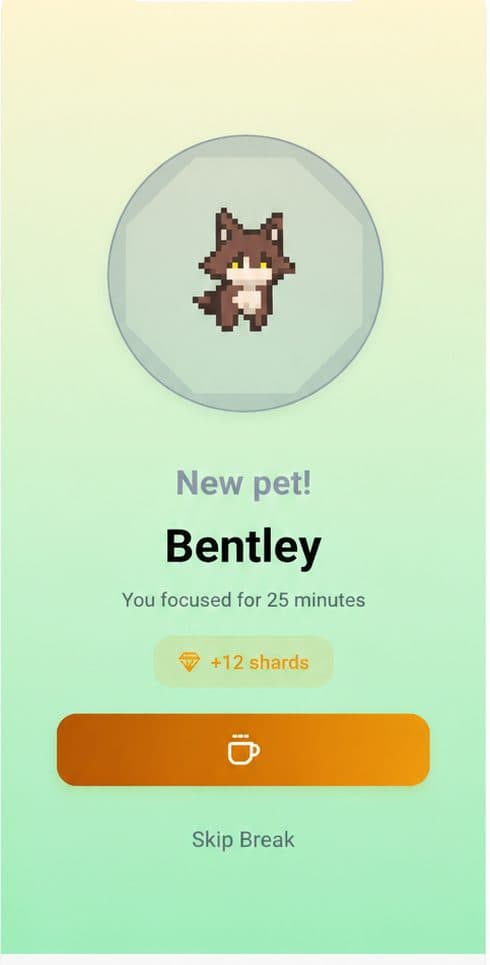
Nurrow: Not a Toolkit, Just a Reason to Stay in the Session
Nurrow doesn't try to plan your day, teach coping strategies, or manage your routines. It does one thing: it runs a timed focus session, blocks distracting websites for the duration, and gives you a reward loop (eggs, pets, friendship levels) for actually finishing sessions instead of abandoning them. That narrow focus is exactly the gap the other three apps on this list leave open; Tiimo can schedule the session, Routinery can sequence the steps around it, and Inflow can teach you why time blindness happens, but none of them are built to sit with you, block your phone or browser, and hand you a small reward the moment you actually finish. It's free to start, with no account required to begin. You can read more about how the timer and blocking work on the Nurrow homepage. For a lot of people, the realistic setup isn't Nurrow instead of Tiimo, Inflow, or Routinery, it's Nurrow alongside whichever one of those already fits how you plan or build routines.
Matching the App to the Actual Problem
None of these apps compete with each other so much as they cover different failure points in the same day:
- If you don't know what your day looks like or how long things will actually take, Tiimo's visual, AI-assisted planning solves that first.
- If you know what to do but a specific routine keeps falling apart step by step, Routinery's guided sequencing is built for exactly that.
- If you want structured education and real coaching to work through patterns like time blindness or rejection sensitivity, Inflow's paid program is the deepest option here, at a real cost.
- If the actual moment you lose is sitting down and staying off your phone once you've decided what to do, that's the specific gap Nurrow is built to close.
Picking one doesn't mean ruling out the others. A lot of people end up running a planner and a focus timer together, since they solve different halves of the same day.
Keep Exploring
Frequently Asked Questions
Do I need more than one ADHD app, or should I just pick one?
It depends on what each one is actually for. A planner like Tiimo and a focus timer like Nurrow solve different problems (structuring your day versus protecting one block of it), so running both isn't redundant the way two Pomodoro apps would be. Where it gets excessive is stacking multiple apps that do the same job. Pick one planner, one focus tool, and add a coaching app like Inflow only if you specifically want the CBT-based program, not because more apps feels like more help.
What's the actual difference between a planner app and a focus-timer app?
A planner, like Tiimo, is built around your whole day: what you're doing, in what order, and for how long, often with AI turning a messy task list into a scheduled plan. A focus-timer app, like Nurrow, is built around a single sitting: start a session, block distracting sites, and get a reward when it's done. Planners help you decide what to do next; focus timers help you actually stay on the thing once you've started it.
Is Inflow's coaching worth the cost for everyone?
Not necessarily. Inflow's paid plans (roughly $47.99 a month or $199.99 a year) include real human coaching and co-working focus rooms on top of its CBT-based educational modules, which is a meaningful commitment for a structured program. If you specifically want guided coaching and community accountability, that price can be worth it. If you mainly need help starting and finishing individual work sessions, that's a narrower problem a free focus timer already solves without the subscription.
Are these apps only for people who've been diagnosed with ADHD?
No. Tiimo, Inflow, and Routinery are built for and marketed to people with ADHD, but the underlying tools (visual timelines, structured routines, guided focus sessions) are useful to plenty of people without a diagnosis who struggle with time blindness or task-switching. None of these apps, including Nurrow, diagnose or treat ADHD; they're practical tools, not medical ones.
Which app should I start with if I'm overwhelmed by choice?
Start with whichever gap is causing you the most trouble right now. If you can't tell what your day is supposed to look like, try Tiimo. If a specific routine (mornings, wind-down, chores) keeps falling apart, try Routinery. If you want structured, guided support and don't mind paying for it, try Inflow. If your actual problem is sitting down and staying off your phone once you've decided what to do, that's what Nurrow is for.
Ready to Start Focusing?
Nurrow is free to start, with no account required to begin. Download it today and put your next focus session to work.