A Focus App for Working From Home, Where the Office Never Really Ends
An office comes with built-in structure you don't have to build yourself: a commute that marks the start and end of the day, coworkers around you, a physical space that means work and nothing else. Working from home strips all of that away. The laundry is visible from your desk. The fridge is thirty feet away. Whoever else is in the house doesn't know, or forget, that you're technically at work. There's no door to walk out of at 5pm, so "done for the day" becomes a decision you have to make on purpose instead of a place you leave.
Nurrow was built with a lot of these problems in mind, not as a general productivity pitch but as a focus app you can use to rebuild the structure a home office doesn't give you for free: blocked distractions, ambient sound to replace the noise of a real workplace, and a way to break the day into sessions with actual breaks in between.
The Distractions Are Different at Home
Office distractions and home distractions aren't the same species. At an office, the main threats are usually digital: social media, news, a group chat. At home you get those too, plus a second layer that never shows up at a desk downtown. The dishes in the sink. A load of laundry that's "just going to sit there wrinkling." A partner, roommate, or kid who doesn't clock that you're in a meeting because there's no door with a light over it. None of these show up on a typical distraction-blocking list, because they aren't websites, they're the physical space you're sitting in.
Nurrow can't stop your dog from wanting a walk, but it can handle the half of the problem that lives on your screen. When a focus session starts, your blocklist kicks in and the sites you'd normally drift to during a "quick break" simply aren't reachable. That removes one whole category of pull, which makes the remaining, physical distractions easier to notice and manage on their own terms.
Deep Work Mode for Meeting-Free Blocks
A remote calendar usually has a mix of two kinds of time: meeting time, where you need email and a browser tab reachable, and meeting-free stretches, where the goal is to actually produce something. Those two kinds of time need different rules, and treating them the same is part of why a "focused" morning can still evaporate into tab-switching.
Deep Work mode is built for the second kind. It blocks the whole internet except an allowlist you set ahead of time, and it can't be turned off mid-session without a safety phrase and a cooldown timer standing in the way. For a two-hour block between calls where you need to write a proposal or actually finish the report that's been open in a tab since Tuesday, that stricter mode removes the option to "just check one thing" that quietly turns into twenty minutes gone.
When to Use It, and When Not To
Deep Work mode isn't meant to run all day. Most of a remote workday is fine with a standard blocklist session, where email and reference sites stay reachable. Save Deep Work mode for the specific gaps where you know exactly what you're avoiding, and you want the browser out of the picture entirely rather than just discouraged.
Ambient Sound for a Home Office That's Too Quiet, or Too Loud
An office has a certain baseline hum: keyboards, hallway conversation, the HVAC. It's easy to focus around because it's steady and it isn't yours to manage. A home office doesn't come with that. It's either dead silent, which can feel oddly distracting on its own, or it's got the actual sounds of your house layered underneath it, a TV in the next room, someone on a call, traffic outside.
Nurrow includes ambient sound built to fill that gap: rain, cafe noise, nature sounds, and lo-fi tracks you can layer under a session. They're steady and non-lyrical on purpose, so they give your brain the same kind of background texture an office provides, without giving you something new to pay attention to.
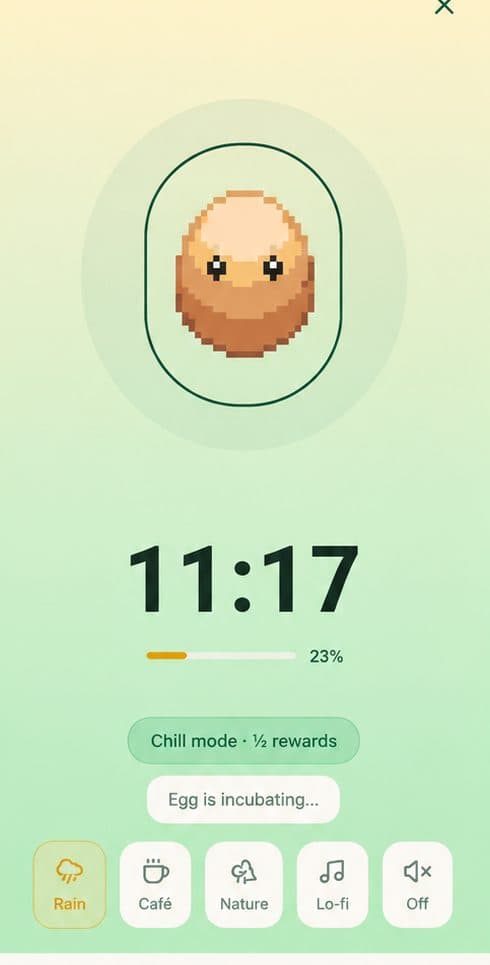
Cafe noise in particular tends to work well for remote workers specifically, since it mimics the low-stakes presence of other people working nearby, the same effect that makes coworking spaces and coffee shops popular with people who work alone.
Structuring a Remote Workday Into Real Sessions
Without a commute or an office to leave, a lot of remote days turn into one long, blurry stretch: work bleeds into lunch, lunch bleeds into a "quick errand," and by 6pm it's unclear where the actual working hours went, even though you never really stopped. Sessions fix this by putting hard edges around work time. A block starts, it runs for a set length, and then it ends, with a break that's an actual break rather than a five-minute scroll that quietly becomes forty.
A workable pattern for a remote day looks something like this:
- Morning: two or three standard blocklist sessions, email and references still reachable, for routine work
- Post-lunch: one Deep Work block for whatever needs your full attention, timed around your actual meeting-free gap
- Afternoon: shorter sessions as energy dips, with real breaks between them instead of pushing through
- End of day: a final session that acts as a deliberate close, since there's no commute to do that job for you
Each completed session earns an egg toward Nurrow's pet collection, so the structure comes with a small, visible payoff attached to it instead of feeling like just another rule you're imposing on yourself. Nurrow is free to start, with no account required to begin, and an optional premium subscription unlocks extras like faster hatching and exclusive pets for people who want them.
None of this requires a perfect schedule. Even a rough version, three or four sessions with clear starts and stops, gives a remote day a shape that "just working from the couch all day" never has on its own.
Keep Exploring
Frequently Asked Questions
Can I use Deep Work mode during a normal workday with meetings?
Yes, just run it in the gaps. Deep Work mode blocks everything except your allowlist for the length of the session, so it's meant for the meeting-free blocks on your calendar, not your whole day. Start it after your last call, set it to end before your next one, and treat the meeting itself as the natural stopping point instead of trying to fight the timer.
What ambient sounds does Nurrow offer for a home office?
Nurrow includes rain, cafe noise, nature sounds, and lo-fi tracks you can play during a session. They're there to fill the quiet a real office would otherwise provide, or to cover up the sounds of your own house, without pulling your attention the way a video or a curated playlist would.
How do I stop my family or roommates from interrupting a session?
Nurrow can't lock your door, but it can make a session visibly "on." A timer running with sound on is an easy signal to point to when you ask people at home to hold questions until it ends. Pairing that with short sessions helps too, since a 25 or 50 minute ask is a lot easier for a housemate to respect than a vague "don't bother me."
What if I get pulled into a chore mid-session?
If you leave and close the app, the session ends without a reward, the same as if you'd gotten distracted at a desk in an office. Nothing is lost beyond that. You can restart as soon as you're back, and a lot of people find it easier to finish the chore first and start a fresh session after, rather than trying to pause and resume.
Is Deep Work mode too strict for everyday remote work?
It can be, and that's fine, it's not meant for every block. Standard blocklist sessions cover most of the day, where you still want email or a reference site reachable. Deep Work mode is for the specific stretches where you need the browser fully out of the picture, like writing something long or getting through a task you've been avoiding.
Ready to Start Focusing?
Nurrow is free to start, with no account required to begin. Download it today and put your next focus session to work.