The Best Focus Apps in 2026, Reviewed Honestly
By Aaron Wakely, Nurrow founder · July 19, 2026
There's no shortage of "best focus apps" lists online, and most of them read like the author never opened half the apps they're ranking. This one is different: it covers what each app is actually built for, who it fits, and where it falls short, so you can pick based on your own habits instead of a generic top-five graphic. We'll start with Nurrow (since we built it, full disclosure) and then get into real competitors: Forest, Focus To-Do, Session, and Freedom.
Nurrow: Gamified Focus With a Pet That Depends on You
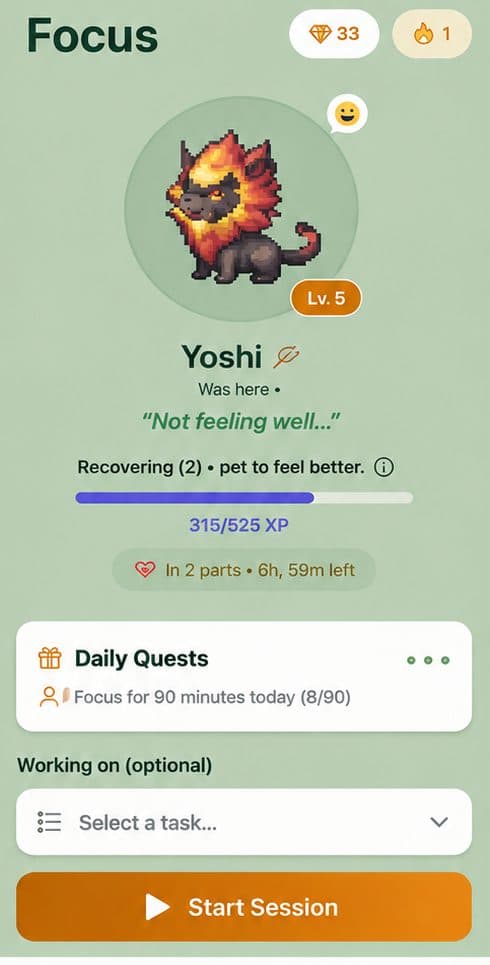
Nurrow pairs a standard focus timer with a pet-collection reward loop. Complete a session and you earn a chance at an egg; hatch eggs to discover one of 100+ pets, then build friendship with them through more sessions. On the blocking side, it has a regular website blocklist for everyday sessions and a stricter Deep Work mode that locks down all browsing except an allowlist you set in advance, with a cooldown before you can back out early. It's free to start, with no account required to begin, and a premium subscription is available on top for people who want faster hatching and exclusive pets, though it isn't required to use the core app.
Where it's genuinely strong: if you've tried plain Pomodoro timers before and lost interest after a week, the streaks, egg drops, and pet friendship levels give you a reason to come back that a bare countdown doesn't. Where it's not the right fit: if you want the absolute simplest possible timer with nothing else on screen, the collection system and shard economy are extra surface area you didn't ask for. Someone who wants pure minimalism is better served by an app built around that instead of one built around a reward loop. You can see the full feature breakdown on the Nurrow homepage.
Forest: The Original Tree-Growing Timer
Forest popularized the whole idea of a visual reward tied to a focus session: plant a tree, and it grows while you work, or dies if you leave the app early. It's simple, intuitive, and doesn't require any setup to understand. It also does device-wide app blocking on both mobile and desktop, not just inside a browser tab, which is a real advantage over browser-only blockers. What it lacks is depth over the long run; once you've seen a handful of tree species, the visual novelty wears thin for some users, and the collection layer is comparatively shallow. It's best for people who want one clear, low-effort visual and nothing more to manage.
Focus To-Do: Pomodoro Timer Plus Task List
Focus To-Do's whole pitch is combining a Pomodoro timer with a built-in task manager, so your to-do list and your focus sessions live in one place instead of two separate apps. That's genuinely useful if task-switching between a planner and a timer is part of what breaks your focus in the first place. It doesn't have any gamification or pet-style reward system, and its distraction blocking is lighter than dedicated blocking apps. It's best for people whose main problem is disorganization rather than willpower or motivation.
Session: Minimalist Pomodoro for Mac and iOS
Session is a clean, well-designed Pomodoro app built specifically for macOS and iOS, with no gamification layer at all. It leans into simplicity harder than Forest does: no trees, no pets, no shop, just a timer with thoughtful defaults and good integration with Apple's ecosystem (widgets, Focus modes, menu bar). The tradeoff is platform lock-in; there's no Android or Windows version, so it's only an option if you're fully in the Apple ecosystem. It's best for people who've already decided they don't want a reward mechanic and just want a well-built timer.
Freedom: Strict, Cross-Device Blocking
Freedom isn't really a timer app first, it's a blocking app first. It lets you schedule and sync blocklists across phone, tablet, and computer at the same time, which matters if your distractions follow you from one device to another rather than staying in one browser. It doesn't have a timer-driven reward system or any collection mechanic, and it's a subscription product rather than a free tool with optional extras. It's best for people whose main problem is cross-device willpower rather than motivation to sit down and start a session in the first place.
How to Actually Pick One
Work backward from what actually derails your focus, not from which app has the most features:
- If you keep abandoning timers because there's no reason to come back tomorrow, a gamified app like Nurrow gives you a streak and a collection to maintain.
- If you want the absolute simplest possible experience with nothing extra to think about, Forest or Session fit better.
- If your distractions follow you across every device you own and blocking strength matters more than motivation, Freedom is built for exactly that.
- If disorganization is the real issue, not motivation, Focus To-Do's built-in task list solves a different problem than the others on this list.
- If price is a hard constraint, start with whichever app's free tier covers your actual needs and only upgrade if you hit a real limit, not because a paid badge looks more legitimate.
None of these apps are wrong choices; they're built around different assumptions about what makes someone stick with focus sessions. The honest test is whichever one you'll still be opening in a month, not the one with the longest feature list on launch day.
Keep Exploring
Frequently Asked Questions
Is a free focus app as good as a paid one?
Often, yes. Most of the apps on this list, including Nurrow, are free to start with the core timer and blocking features included. Paid tiers usually add convenience (faster hatching, extra themes, more granular scheduling) rather than functionality you strictly need to focus better. Try the free version first and only pay if you hit a real limitation.
Do I actually need more than one focus app?
Rarely. Running two timer apps side by side just adds friction and splits your stats across two places. Pick the one whose reward system and blocking strength match how you actually get distracted, and give it a real trial (a week or two) before switching to something else.
What matters most when picking a focus app?
Start with what actually pulls your attention away. If it's your phone or browser, blocking strength matters more than any reward system. If you show up but can't stay motivated day after day, a gamified app with streaks and collectibles will matter more than stricter blocking. Price and platform support (does it run on the devices you use) narrow the list from there.
Are gamified focus apps just a gimmick?
Not inherently. The mechanism behind streaks, pets, and rewards is the same one behind habit trackers and fitness apps: consistent small rewards make it easier to show up again tomorrow. It's a gimmick if the reward loop is the only thing there; it's useful if it's paired with real blocking and a timer that gets out of your way otherwise.
Should I pick based on price alone?
Price is worth weighing, but it shouldn't be the first filter. An app you stop opening after a week because it doesn't fit your habits is a worse deal than a slightly pricier one you stick with for months. Test the free tier of your top pick before comparing subscription costs.
Ready to Start Focusing?
Nurrow is free to start, with no account required to begin. Download it today and put your next focus session to work.