Apps Like Forest: How the Alternatives Actually Compare
By Aaron Wakely, Nurrow founder · July 19, 2026
Full disclosure: I make Nurrow, one of the alternatives compared here. The verdict box and table below were added in August 2026 with sources and dates on every checkable claim.
The short version
Forest is now free to download and use: its official site states, as of August 2026, that no payment is required and the core focus experience (timer, Deep Focus app blocking, group focus) is included, with Forest Plus as an optional subscription. Many older articles still call Forest a $3.99 one-time purchase; that no longer matches forestapp.cc. Choose Forest for minimalist trees, device-wide blocking, and its real-tree program. Choose Nurrow if you want a companion with a name instead of a consequence with leaves. Details and a fair split below.
| As of Aug 2026 | Forest | Nurrow |
|---|---|---|
| Price model | Free core per its official site; Forest Plus subscription for extras (old Pro one-time purchase closed to new users) | Free to start; optional subscription, priced in-store |
| Companion model | Trees you grow (and can lose) | 100 named pets with rarity, levels, and friendship |
| Platforms | iOS, Android, Chrome/Firefox extensions with account sync | Native Android and iPhone apps; works offline |
| Account required | For sync | No |
| Shared with third parties (per Play Data Safety listings, checked Aug 13, 2026) | Email address, for advertising or marketing (listing) | Nothing; the listing reads "No data collected" |
| Real-world impact | 2M+ real trees planted via Trees for the Future (official site) | None claimed |
Forest is one of the most recognizable names in focus apps, and for good reason. Millions of people have planted a virtual tree while they worked, and the core idea still holds up: start a timer, watch a tree grow, and if you leave the app early, the tree dies. It's simple, it's visual, and it works as a gentle nudge to stay put. If you've searched "apps like Forest," you're probably either looking for something cheaper, something with more depth, or something that blocks distractions more aggressively. Here's an honest look at where Forest excels, where Nurrow and other alternatives differ, and how to figure out which one actually fits how you work.
What Forest Gets Right
Forest's biggest strength is that it doesn't overcomplicate things. You plant a tree, you focus, the tree grows. There's no learning curve, and the metaphor is immediately intuitive even to someone who's never used a focus app before. A few other things it does well:
- Cross-device app blocking that works on both mobile and desktop, not just inside a browser tab.
- A large, established user base, which means a mature app with years of bug fixes and a big community of people using it the same way you would.
- A cosmetic tree and coin shop, so there's a light collection loop even if it's not the main focus of the app.
- A real-world tree-planting partnership, which gives some users an extra reason to stick with sessions.
If what you want is exactly that experience (minimal setup, one clear visual, nothing else to think about) Forest is genuinely hard to beat, and switching apps for the sake of switching isn't worth it.
Where Nurrow Takes a Different Approach
Nurrow starts from a similar premise (stay focused, get rewarded with something you want to look after) but builds it out further in a few specific directions.
A deeper collection system
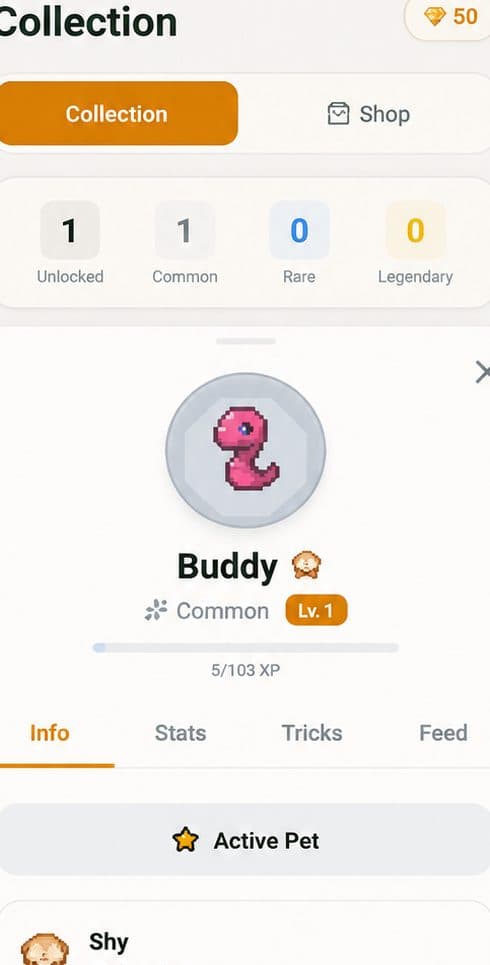
Instead of one tree species growing taller, Nurrow has a collection of 100+ unique pets split across rarity tiers. You earn eggs by completing focus sessions, hatch them to find out what you got, and build friendship with pets over time through more sessions. If Forest's tree felt like it plateaued once you'd seen a few variations, this is the part of Nurrow built to keep giving you something new.
Two levels of blocking
Nurrow gives you a standard website blocklist for everyday sessions, plus a separate Deep Work mode that blocks all browsing except an allowlist you set in advance, with a cooldown before you can back out. Forest's app-level blocking works across your whole device rather than just the browser, which for some people is actually the stronger option depending on where their distractions live. If most of your distraction is browser tabs, Nurrow's two tiers give you more control over exactly how locked down you want to be.
An economy built around streaks
Nurrow layers an egg and shard economy on top of the timer. Longer sessions increase your odds of an egg drop, daily streaks earn shards, and hitting milestones (7, 14, 30, 60, 100 days) unlocks bonus rewards. Shards can be spent on pets, eggs, or faster hatching. Forest's coin system is comparatively simpler: plant trees, earn coins, spend them on shop items. Neither approach is wrong, it depends on whether you want a light layer on top of the timer or a fuller game loop running alongside it. You can see the full breakdown of how all of this fits together on the Nurrow homepage.
Where Forest Might Still Be the Better Fit
To be fair to Forest, there are real situations where it's the better choice, not just the older one:
- You want pure minimalism. One tree, one timer, no shop to browse, no rarity tiers to think about. If a fuller game loop feels like its own distraction, Forest's simplicity is a feature, not a limitation.
- You already have a large tree collection in Forest. There's no way to bring that history into another app, and years of planted trees are worth something to a lot of people.
- You specifically need device-wide app blocking (not just browser blocking) and you're not planning to use a stricter Deep Work-style mode.
A Couple of Other Options Worth Knowing About
Forest and Nurrow aren't the only two apps in this space. Two others come up often enough to mention:
- Focus To-Do combines a Pomodoro timer with a built-in task manager, so your to-do list and your focus sessions live in the same app. It's a good pick if you want task tracking baked in, though it doesn't have a pet or collection system.
- Session is a clean, minimalist Pomodoro app for macOS and iOS. It leans even further into simplicity than Forest does, with no gamification layer at all, which makes it worth a look if you've decided you don't want a collection mechanic of any kind.
Which One Should You Actually Use?
If you like the core Forest idea but want more to work toward over the long run, more variety in what you're collecting, and a stricter blocking option for the sessions where you really can't afford to get pulled away, Nurrow is built for that. If you'd rather keep things as simple as a single tree and you're not looking for a bigger system underneath it, Forest still does that job well. Either way, the honest answer is that the best focus app is the one you'll actually keep opening, so it's worth trying a session or two in whichever one sounds more like you before committing.
- Choose Forest if you want proven minimalism, device-wide app blocking, browser extensions with sync, or the real-tree program (2M+ planted per its site). It's free now, which removes the old reason to look for a cheaper alternative.
- Choose Nurrow if a consequence never made you come back but a companion might: 100 pets with names, moods, and friendship, hatched from finished sessions, no account, no ads, and a listing that reads "No data collected."
Keep Exploring
Frequently Asked Questions
Is Nurrow free like Forest?
Nurrow is free to start, with no account required to begin focusing. Like Forest, there's an optional paid layer on top: Nurrow's premium subscription unlocks faster hatching and exclusive pets, while Forest sells its tree shop items and, on some platforms, a one-time purchase. Neither app requires you to pay to get real use out of it.
Can I switch from Forest without losing my progress?
You can't import a Forest tree collection into Nurrow (the two apps don't share data), but starting fresh is quick: Nurrow doesn't require an account to begin, so you can install it and start your first focus session in under a minute. Your Forest history stays put in Forest if you ever want to go back.
Does Nurrow block apps, or just websites?
Nurrow blocks distracting websites through its blocklist on Android and iPhone, and it also has a stricter Deep Work mode that blocks all browsing except an allowlist you set. Forest's app-blocking, by contrast, works at the device level across mobile and desktop. If you specifically need whole-app blocking (not just browser tabs) on every platform, check which mode fits your workflow before switching.
Why would I pick pets over trees?
It comes down to what keeps you motivated. Forest's tree is a simple, one-shot visual: you either finish your session or the tree dies. Nurrow's pets add more layers, rarity tiers, friendship levels, an egg and shard economy, and streak milestones, so there's more to build toward over weeks and months, not just per session.
Is there a Forest alternative for PC or desktop?
Not from Nurrow quite yet: Nurrow is a mobile app today (Android and iPhone), with a desktop app and browser extension coming later. If your distractions live on your computer right now, Forest's own desktop apps and extension, or a dedicated desktop blocker like Cold Turkey or Freedom, are the honest answer, and plenty of people pair one of those with Nurrow on their phone, since for most people the phone is the bigger distraction anyway.
Are Focus To-Do or Session better than Forest?
They're built for different priorities. Focus To-Do leans into task management with a built-in to-do list alongside its timer. Session is a minimalist macOS/iOS-only Pomodoro app with almost no gamification. Neither has a pet or collection system; if that's what you're after, Nurrow is the closer fit.
Ready to Start Focusing?
Nurrow is free to start, with no account required to begin. Download it today and put your next focus session to work.