Focus To-Do Alternative: What You Gain and What You Give Up
By Aaron Wakely, Nurrow founder · July 19, 2026
Focus To-Do built its name on a simple pairing: a Pomodoro timer and a real task manager, living in one app. If you've searched for a Focus To-Do alternative, you're likely one of two people. Either the task-management side feels like more than you need, and you're wondering what a lighter, more reward-driven app looks like. Or you've heard about Nurrow's pet-and-blocking approach and want to know if it can actually replace what Focus To-Do does. The honest answer sits in the middle, and it's worth saying upfront: these two apps solve different problems, and one of them (Nurrow) is missing a feature the other treats as core.
What Focus To-Do Actually Does Well
Focus To-Do isn't just a timer with a task list bolted on. The two are woven together in ways that matter if you're managing more than a couple of things at once:
- Recurring tasks and subtasks, so a checklist under a bigger goal stays organized instead of living in a separate notes app.
- Color-coded priority levels and reminders with recurring due dates, which keep deadlines visible without extra setup each time.
- An estimated pomodoro number per task, so you get a rough sense of workload before you start, not just after.
- Cross-platform sync across Android, iOS, Windows, Mac, and a browser extension, so your task list and timer state follow you between devices.
- A Reports feature with detailed time-distribution statistics, including a Gantt chart of focus time and completed-task stats tied back to specific tasks.
None of that has anything to do with gamification. Focus To-Do has no pet, no collection system, no reward loop beyond checking a box and watching your stats fill in. It isn't trying to be motivating in that sense. It's trying to be a competent project-and-timer tool, and on that specific job, it delivers.
Where Nurrow Is Different (and Where It's Simply Missing Something)
Nurrow takes the Pomodoro-style timer and points it in a different direction. Instead of building out task management, it builds out two other things: distraction blocking and a reward loop.
A simple task list, not a project manager
Nurrow does have a task list: add a task, tag it, give it an optional time estimate, and link it to a session so the minutes you actually spend track back to it automatically. What it doesn't have is subtasks, due dates, recurring tasks, priority levels, or cross-device sync. If you rely on an app to hold a real project backlog while you work through it pomodoro by pomodoro, Nurrow's task list is too thin for that job. You'd need to keep that structure somewhere else (a plain notes app, a dedicated to-do app, or Focus To-Do itself) and use Nurrow's task list only for the lightweight session-linking it's built for.
Website blocking built into the session
Where Focus To-Do assumes you'll manage distractions yourself, Nurrow bakes blocking into the timer. A standard blocklist covers everyday sessions, and a stricter Deep Work mode blocks all browsing except an allowlist you set in advance, with a cooldown before you can back out early. If tab-switching is your specific failure mode, that's a layer Focus To-Do doesn't offer at all.
A pet instead of a checklist
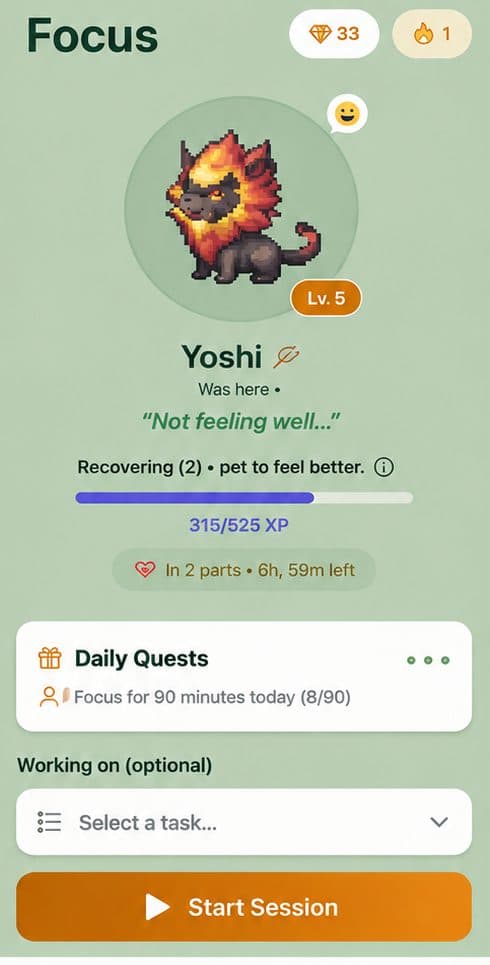
Every focus session in Nurrow has a chance to earn an egg. Hatch it, and you get a new pet to add to a collection of 100+, each with rarity tiers and friendship levels that grow the more you focus. Daily streaks earn shards, and milestones at 7, 14, 30, 60, and 100 days unlock bonus rewards. It's a completely different kind of motivation than checking off a task, less about tracking what you did and more about giving you something to look forward to before you even start. You can see the full picture of how the loop fits together on the Nurrow homepage.
Who Each App Actually Fits
Students juggling assignments across multiple classes, or remote workers tracking deliverables across several projects, tend to lean on Focus To-Do's subtasks and due-date reminders to keep everything from slipping. Nurrow's task list doesn't have that structure, so it doesn't address that need. On the other hand, people who already keep their tasks somewhere simple (a paper planner, a single running note, or Nurrow's own lightweight list) and whose real problem is opening a new tab five minutes into a session tend to get more out of Nurrow's blocking and reward loop than they would from a fuller task manager they'd only half use.
So Which One Should You Actually Use?
If your work involves managing a real backlog (subtasks, deadlines, recurring to-dos, and reports that tie your time back to specific tasks) Focus To-Do is built for that, and Nurrow's task list simply isn't a substitute. Don't switch expecting Nurrow to replace a project manager, because it won't.
If what pulls you off task is distraction rather than disorganization, and Nurrow's own lightweight list (or nothing formal at all) is enough to hold what you're working on, its blocking and pet loop are built specifically for that moment. And you don't have to choose exactly one: keeping a real project backlog in Focus To-Do and running Nurrow purely for the focus session, reward loop, and a simple per-session task link is a completely reasonable setup, and one a lot of users land on anyway.
Keep Exploring
Frequently Asked Questions
Does Nurrow have a task list like Focus To-Do?
Yes, a lightweight one. You can add tasks, tag them, give one an optional time estimate, and link a task to a focus session so actual minutes track automatically as you work. What it doesn't have is subtasks, due dates, recurring tasks, priority levels, or cross-device sync. If you're managing a real backlog with deadlines and structure, Focus To-Do (or a dedicated to-do app used alongside Nurrow) is the better fit.
Can I use Nurrow and Focus To-Do together?
Yes, and plenty of people do some version of this. Keep your subtasks and due dates in Focus To-Do, and run Nurrow separately when you want stronger website blocking and a pet to work toward, using its own simpler task list just to link a session to what you're working on. They don't sync with each other, so you'd be managing two apps, but nothing stops you from using Focus To-Do for planning and Nurrow for the actual focus session.
What does Focus To-Do's Reports feature show that Nurrow's stats don't?
Focus To-Do's Reports include a Gantt chart of your focus time and detailed completed-task stats, tying your time-distribution data directly to the tasks you finished. Nurrow does tie actual minutes back to whichever task was active during a session, but it has no equivalent reporting view, no Gantt chart, no cross-task time-distribution breakdown. If task-level reporting matters to you, Focus To-Do covers that ground and Nurrow doesn't.
Is Focus To-Do free?
Focus To-Do offers a free tier with core Pomodoro and task features, with a paid Pro tier for extras like unlimited task lists and advanced statistics. Nurrow is free to start too, with no account required to begin a session, and an optional premium subscription for faster hatching and exclusive pets. Neither app requires payment to get real use out of it.
Which app is better for ADHD?
It depends on what you struggle with more: forgetting what you're supposed to be doing, or getting pulled away from doing it. Focus To-Do's subtasks, priorities, and recurring reminders help externalize a task list so nothing falls through the cracks. Nurrow's blocking and pet-reward loop are aimed more at the moment you're tempted to switch tabs. Some people genuinely need both, in separate apps.
Ready to Start Focusing?
Nurrow is free to start, with no account required to begin. Download it today and put your next focus session to work.