Apps Like ScreenZen: Speed Bumps vs. Finish Lines
By Aaron Wakely, Nurrow founder · August 9, 2026
ScreenZen has quietly become one of the best-liked screen-time apps around, for a disarming reason: it's genuinely free, and it doesn't try to ban anything. It just adds speed bumps, a pause before an app opens, a cap on opens per day, a budget per visit, and lets the friction do the work. If you're looking at alternatives, the question worth asking first is which problem you're actually solving: too many mindless opens, or too few finished focus hours. They're different problems with different best tools.
What ScreenZen Gets Right
- Free, on both iPhone and Android, with no feature wall waiting behind week two.
- Fine-grained friction: pauses, open counts, and per-open time budgets you can tune per app, which respects that not every app deserves the same treatment.
- A philosophy of reduction rather than prohibition, which survives real life better than hard bans do.
Where Nurrow Takes a Different Approach
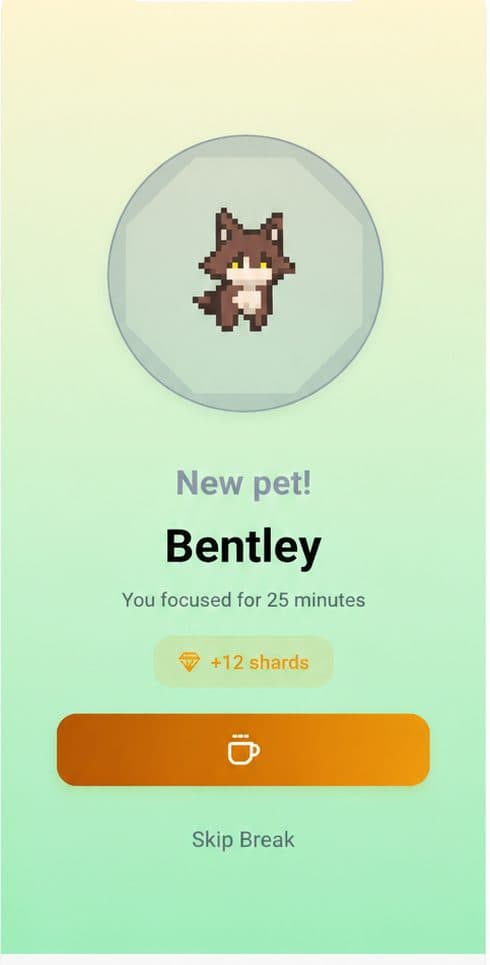
Nurrow doesn't patrol your whole day; it protects the hours you choose. Start a session and the sites on your blocklist stop loading until the timer ends. What makes it stick is what accumulates: eggs hatch into a collection of 100+ pets across rarity tiers, friendship levels deepen with use, and your streak builds a cost to skipping tomorrow. Friction-based tools reset to zero every morning; a collection and a streak don't. It's free to start on Android and iPhone, no account required.
Where ScreenZen Is Still the Better Fit
If your issue is the drip, dozens of small reflexive opens scattered across the day rather than ruined work blocks, ScreenZen treats exactly that, at exactly the right price. It also reaches apps, not just websites, which matters when the time sink is TikTok or Instagram rather than the browser. For pure all-day app discipline with zero budget, it's the honest recommendation.
Which One Should You Actually Use?
Count where the hours actually go. If they leak away one two-minute scroll at a time, start with ScreenZen. If they vanish in ruined afternoons where you sat down to work and surfaced three tabs deep in something else, start with Nurrow, the blocked session plus the pet waiting at the end is built for precisely that afternoon. Both free tiers are real, so testing each against your own week is cheap, and running both together covers the whole day.
Keep Exploring
Frequently Asked Questions
What does ScreenZen do, exactly?
ScreenZen sits in front of your distracting apps with configurable speed bumps: a pause screen before an app opens, limits on how many times a day you can open it, and time budgets per open. It's genuinely free, works on both iPhone and Android, and its whole philosophy is reducing mindless opens rather than banning apps outright.
If ScreenZen is free, why consider anything else?
Because speed bumps and rewards solve different problems. ScreenZen reduces how often you fall into an app by accident; it doesn't give your focused hours any structure, and it doesn't build anything over time, there's no accumulating progress that makes tomorrow's discipline easier than today's. People who leave ScreenZen usually aren't leaving because the bumps failed, they're leaving because they need a reason to focus, not just an obstacle to scrolling.
How does Nurrow differ mechanically?
Nurrow is session-based: you start a focus timer, the websites on your blocklist become unreachable until it ends, and finishing earns egg progress toward a collection of 100+ pets, plus streak credit. ScreenZen intervenes every time you approach a distracting app; Nurrow protects defined blocks of time and pays you for completing them. One shapes your whole day passively, the other makes specific hours count.
Which is better for students?
For studying specifically, session-based tools tend to fit better, because studying happens in blocks, and a block with the exits closed plus a reward at the end maps directly onto how study sessions actually work. ScreenZen still helps as an all-day background layer against reflexive scrolling between classes. If you only install one, match it to where you lose more time: mid-study distraction points to Nurrow, all-day drift points to ScreenZen.
Can I run ScreenZen and Nurrow together?
Yes, and it's a sensible stack since they never overlap: ScreenZen's pauses and open-limits run all day against app impulses, while Nurrow runs your deliberate focus sessions with website blocking and the pet reward loop. Both are free to start, so the stack costs nothing to try for a week.
Ready to Start Focusing?
Nurrow is free to start, with no account required to begin. Download it today and put your next focus session to work.