The Best Website Blockers in 2026, Compared Honestly
By Aaron Wakely, Nurrow founder · August 9, 2026
Every website blocker on this list works. The differences that actually matter are philosophy (does it stop you, or motivate you?), platform (phone, desktop, browser, or all three?), and price model. This roundup covers those differences honestly, starting with Nurrow, since we built it and you should weigh that disclosure accordingly, followed by Cold Turkey, Freedom, StayFocusd, and Opal.
Nurrow: Blocking With a Reward Loop
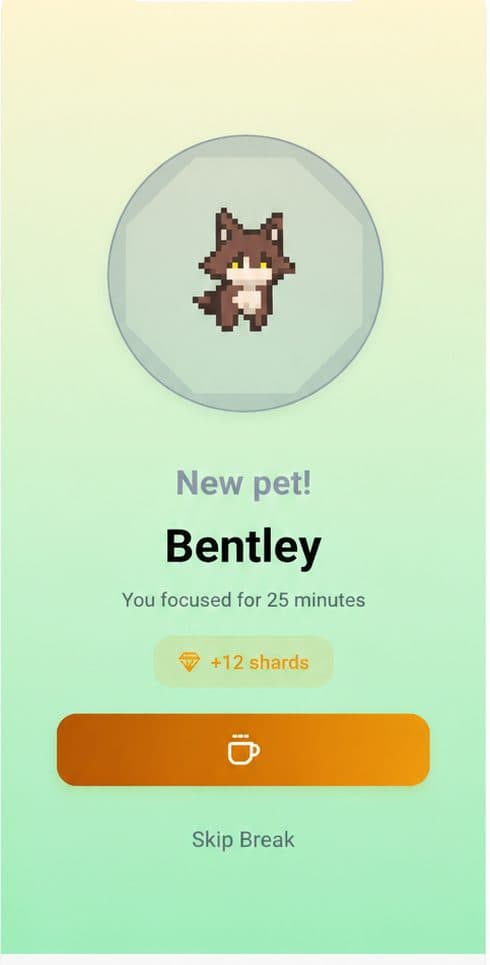
Nurrow ties website blocking to focus sessions instead of blanket schedules: start a session and the sites on your blocklist become unreachable until it ends, with a stricter allowlist-only Deep Work mode for when a plain blocklist isn't enough. What makes it different from everything else here is the reward system. Finished sessions earn eggs that hatch into a collection of 100+ pets, streaks build day over day, and friendship levels grow the more you show up. It's free to start with no account required, on Android and iOS, with desktop support planned for later. The honest limitations: it's phone-first today, and it doesn't match the hard-lock severity of dedicated enforcement tools, because it's betting that motivation, not maximum strictness, is what most people are actually missing.
Cold Turkey: Maximum Enforcement on Desktop
Cold Turkey Blocker is the strictest tool on this list, full stop. Its locked blocks can't be cancelled mid-block, it can block desktop applications and not just websites, and its hardest modes can lock down the whole machine. The free tier covers website blocking, and the Pro version is a one-time purchase rather than a subscription. The tradeoffs: it's Windows and macOS only, with no mobile presence at all, and it does nothing to make you want to focus, it just makes not-focusing unavailable. Best for people who have defeated every softer tool they've tried. We compare it with Nurrow in more depth in Apps Like Cold Turkey.
Freedom: One Blocklist Across Every Device
Freedom's pitch is synchronization: one blocklist and one schedule enforced simultaneously on your computer, phone, and tablet. That's the right tool when your distraction migrates, when blocking Reddit on your laptop just moves the scrolling to your phone. It supports scheduled recurring sessions and a locked mode to stop mid-session cancellation. It's a subscription product with no meaningful free tier beyond a trial, and there's no reward or motivation layer. Best for people whose problem is genuinely multi-device.
StayFocusd: The Free Chrome Standby
StayFocusd is a free Chrome extension that gives distracting sites a daily time budget: burn through your allotted minutes and those sites are gone until tomorrow, with a Nuclear Option for blocking everything for a set period. It's the fastest thing on this list to set up and costs nothing. The limits are structural: it only exists inside Chrome, so it does nothing about your phone, other browsers, or desktop apps, and determined users can disable the extension. Best as a first, zero-cost step before deciding whether you need something stronger.
Opal: Screen-Time Focus for iPhone
Opal is built around reclaiming phone time on iOS, using Apple's Screen Time hooks to block apps and websites during focus sessions and to report how much attention you're actually reclaiming. It has session scheduling, varying strictness levels, and polished progress reports. It's subscription-based for its full feature set, and it's phone-first, so it isn't the tool for desktop-heavy distraction. Best for iPhone users whose problem is the phone itself rather than the browser on their computer.
How to Actually Pick One
- Distraction lives on your phone, and you keep abandoning focus tools after a week: Nurrow, because the reward loop is what keeps the habit alive.
- You override every blocker you install, on a computer: Cold Turkey, because it removes the override.
- Blocking one device just moves the problem to another: Freedom.
- You want something free, right now, inside Chrome: StayFocusd.
- You're on iPhone and the phone itself is the problem: Opal, or Nurrow if you want rewards attached to the effort.
The honest meta-advice: blocking strength only matters if you keep using the tool. The best website blocker is the one that's still installed and active a month from now, whichever mechanism, enforcement or motivation, makes that true for you.
Keep Exploring
Frequently Asked Questions
What's the difference between a website blocker and Screen Time?
Screen Time and Digital Wellbeing report on and limit overall usage at the operating-system level, while a dedicated website blocker is built around intentional work sessions: you decide what's blocked and when, usually tied to a timer. The built-in tools are better for blanket limits like keeping total social media under an hour a day, and blockers are better for protecting a specific stretch of focused work.
Do free website blockers actually work?
Yes, within limits. StayFocusd is genuinely free and effective inside Chrome, Cold Turkey's free tier covers website blocking on desktop, and Nurrow's core timer and blocklist are free with no account required. What free tiers generally don't give you is cross-device syncing or the most severe lock modes. Start free and only pay when you hit a wall that's actually about the tool rather than the habit.
Can't I just use willpower instead of a blocker?
You can, but the evidence of most people's browser history says it goes badly. The point of a blocker isn't that you're weak, it's that removing the decision entirely is cheaper than winning the same argument with yourself forty times a day. Even a light-touch blocker converts each temptation from a negotiation into a dead end, which frees attention for the actual work.
What's the strictest website blocker?
On a desktop computer, Cold Turkey is the strictest of the tools on this list: its locked blocks are designed to be impossible to cancel until the timer expires. Nothing on mobile matches that severity because phone operating systems don't allow apps that much control. If you need strictness on your phone, Opal and Freedom get partway there, and Nurrow's Deep Work mode adds a cooldown that makes quitting early deliberately annoying rather than impossible.
Which blocker should I try first?
Match the tool to how your distraction actually happens. Mostly your phone: try Nurrow or Opal. Mostly one browser on one computer: StayFocusd is the fastest to set up. Every device at once: Freedom. If you've already broken through every blocker you've tried: Cold Turkey. If the problem is less about blocking and more about never wanting to start a session at all, that's the case where Nurrow's reward loop is doing the most work.
Ready to Start Focusing?
Nurrow is free to start, with no account required to begin. Download it today and put your next focus session to work.